Event State Machine



A simple event-driven state machine
Free software: MIT license
Documentation: https://event-statemachine.readthedocs.io.
Welcome to Event StateMachine. I always struggled to find a simple state machine that could be used in a Python project. So I decided to create my own, it’s simple but useful. The design is based on transitions more than states, so you can define a transition from one state to another and the event that triggers it.
Getting started
To install Event StateMachine, run this command in your terminal:
$ pip install event_statemachine
Let’s implement this simple turnstile example:
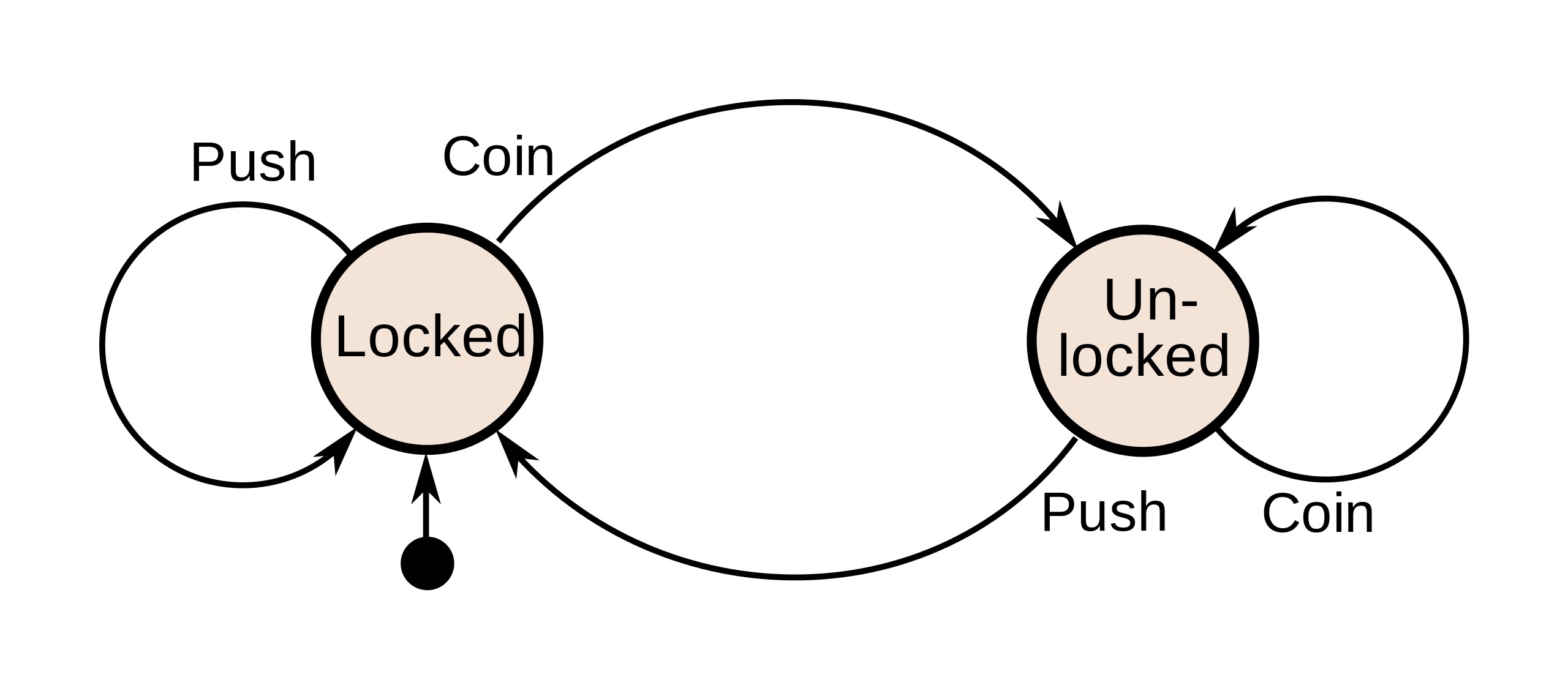
Define your state machine:
from event_statemachine import StateMachine
from event_statemachine import transition
from event_statemachine import event_condition


class Turnstile(StateMachine):
    @transition("Locked -> Unlocked")
    @event_condition(
        lambda self: self.evt.get("action") == "coin"
        and self.evt.get("coin") == "valid"
    )
    def on_coin(self):
        print("Unlocking turnstile")

    @transition("Locked -> Locked")
    @event_condition(
        lambda self: self.evt.get("action") == "coin"
        and self.evt.get("coin") == "invalid"
    )
    def on_coin_invalid(self):
        print("Invalid coin, try again")

    @transition("Unlocked -> Unlocked")
    @event_condition(lambda self: self.evt.get("action") == "coin")
    def on_unlocked_coin(self):
        print("turnstile already unlocked, returning coin")

    @transition("Unlocked -> Locked")
    @event_condition(lambda self: self.evt.get("action") == "push")
    def on_push(self):
        print("Locking turnstile")
Initialize your state machine:
turnstile = Turnstile(initial_state="Locked")
Send events to your state machine:
evt = {"action": "push"}
sm.run_state(evt)  # Do nothing

evt = {"action": "coin", "coin": "invalid"}
sm.run_state(evt)  # Print: Invalid coin, try again

evt = {"action": "coin", "coin": "valid"}
sm.run_state(evt)  # Print: Unlocking turnstile

evt = {"action": "coin", "coin": "valid"}
sm.run_state(evt)  # Print: turnstile already unlocked, returning the coin

evt = {"action": "push"}
sm.run_state(evt)  # Print: Locking turnstile
Features
Define your transitions using
@transitiondecoratorEach transition can have a condition to be executed using
@event_conditiondecorator.You can get the context of the state machine using the method
get_context()and load it using the methodset_context(). This allows you to use a stateless architecture and save the context of the state machine in a database.You can override the methods
on_entryandon_exitin the SM. This code will be executed always at the beginning and at the end of each transition respectively.Using the decorators
@on_state_entryand@on_state_exityou can achieve the same as the previous point but for each state.